

If you’ve been stacking sats with recurring buys, your wallet is quietly accumulating a problem. Not a security problem. A fee problem. This guide explains what UTXO consolidation is, when it’s worth doing, and exactly how to do it in Sparrow Wallet.
The problem: your bitcoin is in pieces
Your wallet balance is not one lump of bitcoin. It’s a collection of separate pieces called UTXOs (unspent transaction outputs). Every time you receive bitcoin, you get a new piece. Fifty weekly DCA buys means fifty separate UTXOs.
Here’s the part that surprises people: your transaction fee depends on how many pieces you spend, not how much value you send. Each UTXO you spend adds roughly 68 vbytes to your transaction. More pieces, bigger transaction, bigger fee.
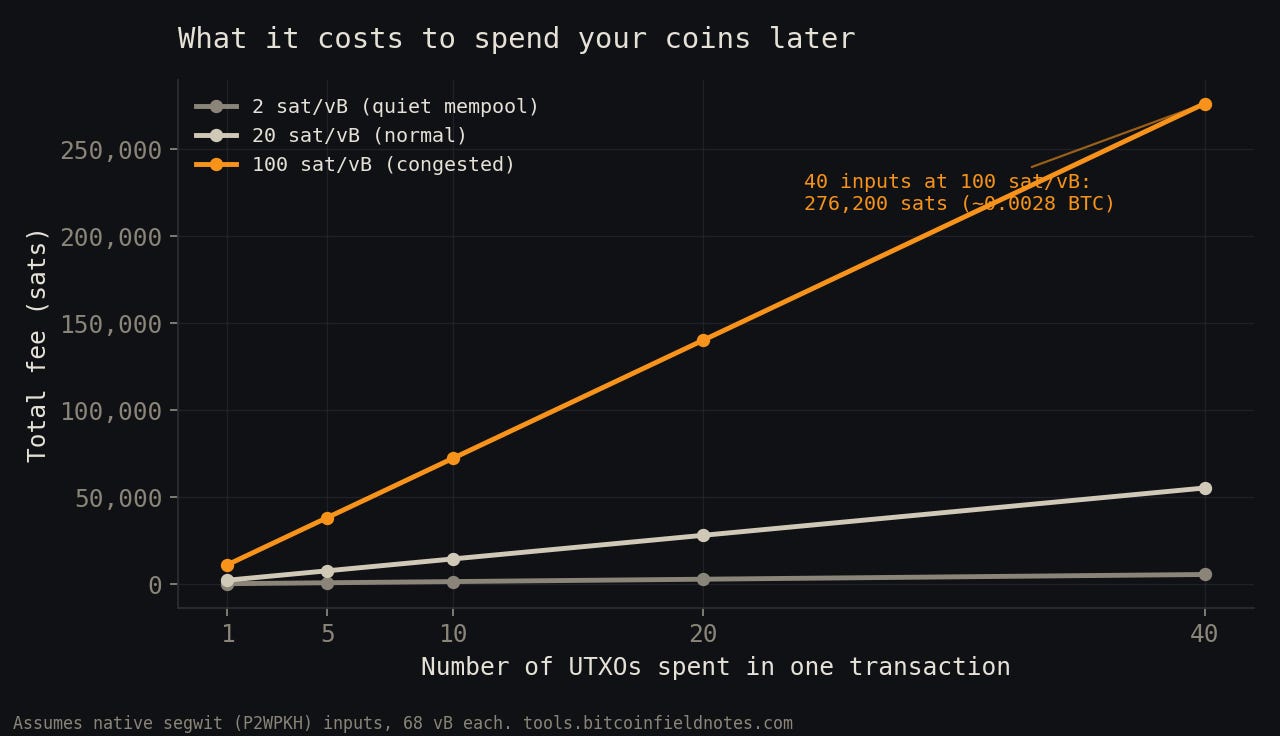
Run the numbers and the gap is stark. Spending 40 small UTXOs at 100 sat/vB costs about 276,000 sats in fees. Spending one UTXO of the same total value costs about 11,000. Same bitcoin, 25x the fee, purely because of how it was stored.
What consolidation actually is
Consolidation is one transaction that spends many of your UTXOs and sends the total back to a single new address you control. Many pieces in, one piece out, minus the fee. The bitcoin never leaves your custody.
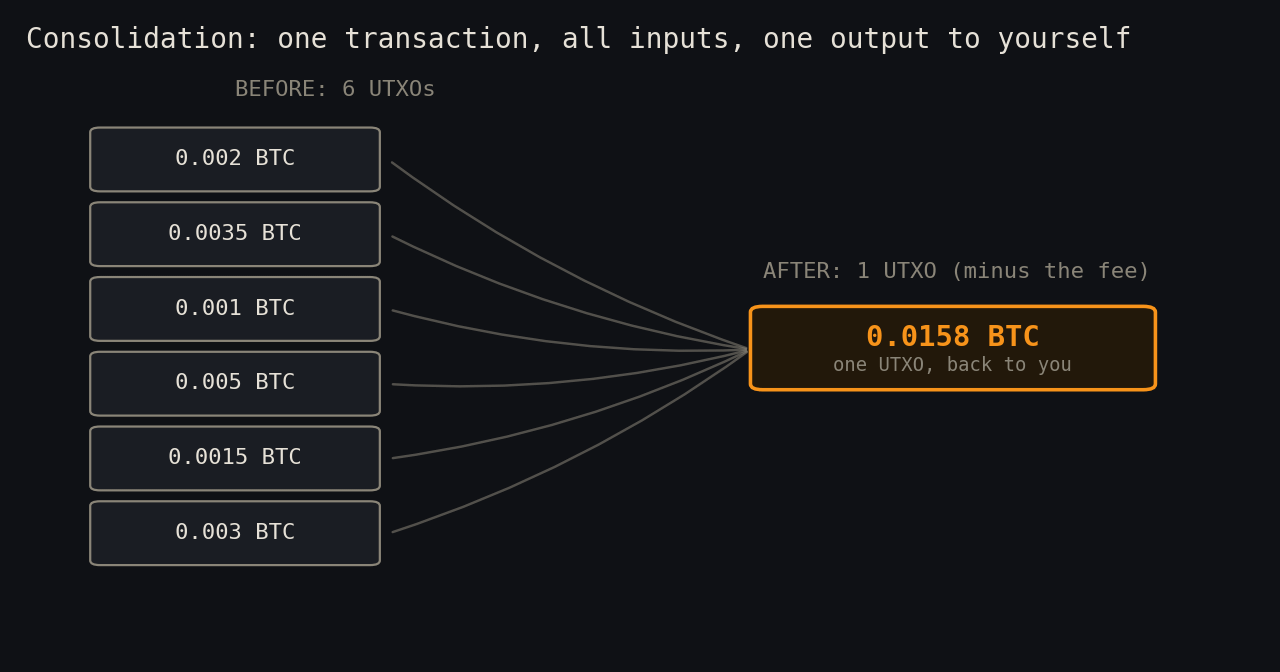
The trade you’re making: pay a small fee now, at a fee rate you choose, so you never have to spend all those inputs later at a fee rate the market chooses for you.
When to consolidate (and when not to)
Consolidate when fees are low. That’s the whole game. Check mempool.space and look for fee rates in the 1 to 5 sat/vB range, which historically shows up on weekends and during quiet stretches. A 40-input consolidation at 2 sat/vB costs around 5,500 sats. The same transaction at 100 sat/vB costs nearly fifty times that.
It’s probably worth doing if you have more than 10 to 20 small UTXOs, especially anything under about 0.001 BTC. Tiny UTXOs can become “dust” that costs more in fees to spend than it’s worth.
It’s probably not worth doing if you have a handful of decent-sized UTXOs, or if privacy is your top priority (more on that below). Consolidation is an optimization, not a requirement.
Want exact numbers for your wallet? We built a free UTXO Consolidation Calculator that uses live fee rates and tells you what consolidating would cost today versus what waiting could cost you.
The privacy tradeoff, in plain English
This is the part most guides skip. Consolidation has a real cost beyond the fee.
When you spend multiple UTXOs in one transaction, you cryptographically prove to anyone watching the chain that one wallet controls all of them. Chain analysis firms assume exactly this (it’s called the common-input-ownership heuristic). If one of those UTXOs is linked to your identity, say from a KYC exchange withdrawal, the link now extends to everything you merged with it.
Practical guidance for beginners:
Don’t consolidate coins you deliberately keep separate (for example, KYC and non-KYC coins). Sparrow lets you label UTXOs, so label first, then consolidate within groups.
Accept that for most DCA stackers, all those UTXOs came from the same exchange account anyway. Consolidating them reveals little that isn’t already knowable.
If strong privacy matters to you, look into coinjoin before consolidating. That’s a separate field note.
Step by step in Sparrow
You’ll need Sparrow Wallet connected to your wallet (hardware wallets work fine; you’ll just confirm on the device at the end).
1. Open the UTXOs tab. In your wallet, click UTXOs in the left sidebar. You’ll see every piece your wallet holds, with amounts, addresses, and labels.
2. Select the UTXOs to merge. Click the first one, then Ctrl-click (Cmd-click on Mac) the others, or Shift-click for a range. Skip anything you want to keep separate.
3. Click “Send Selected” at the bottom of the screen. Sparrow opens the Send tab with exactly those UTXOs locked in as inputs.
4. Pay yourself. In the Pay to field, send the bitcoin back to your own wallet: click the dropdown arrow in the address field and Sparrow fills in a fresh address from this wallet. Add a label like “consolidation June 2026” (your future self will thank you).
5. Click “Max.” This sends the entire selected amount minus the fee, leaving no change output. One input bundle, one output. That’s a proper consolidation.
6. Set a low fee rate. Use the fee slider and aim low: 1 to 3 sat/vB. This transaction is not urgent. If it takes a day to confirm, fine. Sparrow enables RBF (replace-by-fee) by default if you ever need to bump it.
7. Create, sign, broadcast. Click Create Transaction, review the summary (check that the output address is yours), then Finalize, sign with your hardware wallet or password, and Broadcast.
That’s it. Once confirmed, your UTXOs tab shows one tidy output instead of a pile of fragments.
What to watch out for
Verify the destination address is yours before signing. Receiving address from your own wallet, confirmed on your hardware wallet screen.
Don’t consolidate during high fees. Patience is the entire value proposition here.
Don’t merge coins you keep separate for privacy reasons. Once merged on-chain, it’s permanent.
Keep one consolidation rule of thumb: if you’re DCA stacking, consider consolidating once or twice a year during a quiet fee market, rather than letting hundreds of crumbs pile up.
Consolidation is unglamorous wallet hygiene. But it’s the difference between spending your bitcoin on your terms someday and donating a chunk of it to miners because nobody told you your stack was in 80 pieces.
Try the UTXO Consolidation Calculator to see what consolidation would cost you at today’s fee rates.
Not financial advice. Field notes from the workbench at bitcoinfieldnotes.com.